Dashboard settings
Set options with environment variables in Compose, or use their snake_case names in config.yml under settings. YAML takes precedence. CONFIG_FILE and LOCALE are environment-only options.
Before upgrading, review the release notes for breaking configuration changes.
services: dashmark: environment: - SHOW_SEARCH=true - CATEGORY_ORDER=Media,Productivity,Home - METRICS_DATABASE_PATH=/data/metrics.dbsettings: show_search: true category_order: [Media, Productivity, Home] metrics_database_path: /data/metrics.dbDocker and files
Section titled “Docker and files”| Environment variable | Default | YAML key | Purpose |
|---|---|---|---|
DOCKER_HOSTS |
unix:///var/run/docker.sock |
docker_hosts |
Docker endpoint, or named comma-separated endpoints. |
CONFIG_FILE |
/data/config.yml |
None | YAML configuration file path. |
ICONS_DIR |
/data/icons |
icons_dir |
Local icon directory. |
CUSTOM_STYLESHEET |
unset | custom_stylesheet |
Mounted CSS file, served as /custom.css. |
PORT |
4321 |
port |
HTTP port. |
LOCALE |
en-US |
None | Dashboard locale. Supported values: en-US, de, es, fr, it, nl, pl, pt-BR, ru, tr, uk, ar, zh-Hans, zh-Hant, ja, and ko. |
Interface
Section titled “Interface”| Environment variable | Default | YAML key | Purpose |
|---|---|---|---|
SHOW_HEADER |
true |
show_header |
Show the greeting header. |
SHOW_GROUP_TAGS |
true |
show_group_tags |
Show matching access or status groups. |
SHOW_THEME_TOGGLE |
true |
show_theme_toggle |
Show the light and dark theme control. |
SHOW_SEARCH |
true |
show_search |
Show search and category filters. |
SHOW_STATUS |
true |
show_status |
Show container state and health badges. |
SHOW_METRICS |
true |
show_metrics |
Collect and show metrics. |
SHOW_BRANDING |
true |
show_branding |
Show the Dashmark logo near search. |
NEW_TAB |
false |
new_tab |
Open card links in a new tab. |
CATEGORY_ORDER |
unset | category_order |
Set category order; unlisted categories follow alphabetically. |
CUSTOM_HEADER |
unset | custom_header |
Set a greeting template. |
GREETING_MORNING |
Good morning |
greeting_morning |
Morning greeting text. |
GREETING_AFTERNOON |
Good afternoon |
greeting_afternoon |
Afternoon greeting text. |
GREETING_EVENING |
Good evening |
greeting_evening |
Evening greeting text. |
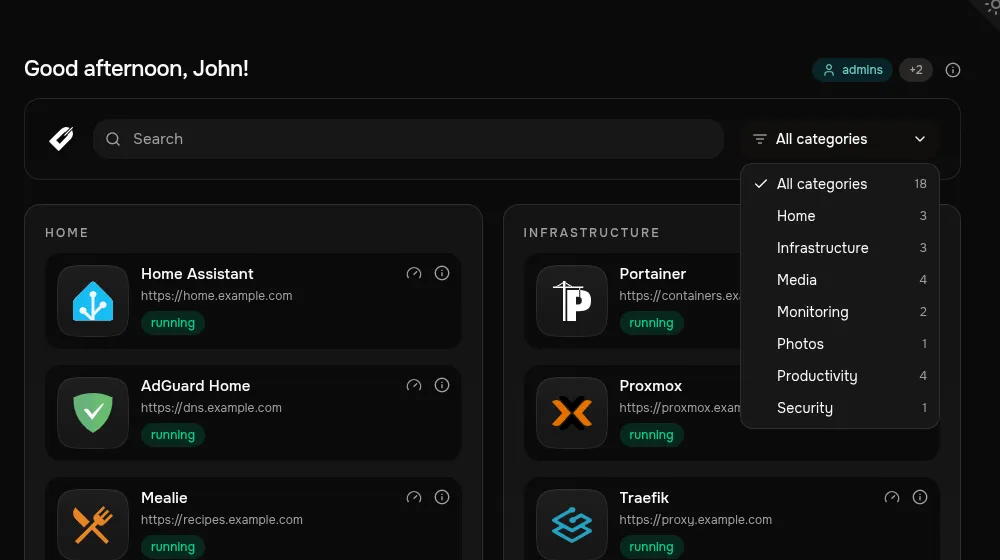
CUSTOM_HEADER can use {greeting}, {full_name}, {first_name}, {last_name}, {username}, and {email}. Configure the greeting text with GREETING_MORNING, GREETING_AFTERNOON, and GREETING_EVENING.
Dashmark resolves greetings using the container’s server time. Set Docker’s TZ environment variable to an IANA timezone such as Europe/London.
Set USER_NAME_HEADER, USER_FIRST_NAME_HEADER, USER_LAST_NAME_HEADER, USER_USERNAME_HEADER, or USER_EMAIL_HEADER when your proxy uses different identity-header names. These map values into the greeting template. See Access control for the supported automatic headers.
Polling and storage
Section titled “Polling and storage”| Environment variable | Default | YAML key |
|---|---|---|
METRICS_POLL_INTERVAL |
10 seconds |
metrics_poll_interval |
METRICS_HISTORY_PERIOD |
300 seconds |
metrics_history_period |
METRICS_DATABASE_PATH |
/tmp/dashmark/metrics.db |
metrics_database_path |
Set METRICS_DATABASE_PATH to a mounted path such as /data/metrics.db if history must survive container replacement.
Custom CSS
Section titled “Custom CSS”Mount a stylesheet and configure its path:
services: dashmark: volumes: - ./data:/data environment: - CUSTOM_STYLESHEET=/data/custom.cssDashmark loads it after built-in styles. Use the documented semantic dashmark-* classes from config/custom.css.example, rather than Tailwind classes or DOM position.